 Totally not a click-bait title, I promise. We’ll be looking at the truth behind the Windows 10 End of Support message that Microsoft’s been popping up on computers in a desperate bid to get you to upgrade to Windows 11.
I’ve been looking at numerous articles on the internet and also watching some YouTubers talk about Windows 10’s End of Support in October 2025 (or if you prefer, later this year).
I work in IT support and I am adept at figuring out the motive behind Microsoft’s decisions when it comes to their operating system. I’ve seen numerous websites produce AI generated slop about this subject and also some YouTubers missing the point. So, it’s time to set the record straight without bullshit.
Windows is still king in the desktop operating share.
It’s without a doubt according to StatCounter that Microsoft Windows is still the dominant operating system in the Desktop market – which includes Intel/AMD/ARM (Snapdragon, etc) laptops as of June 2025.
While the fruity operating system, Apple MacOS (including the Mac OS X-series) is also around 15% when combining the two figures, Linux clocks in at around 4.1%.
So, what’s driving Microsoft to push you off Windows 10 and make you jump into the Windows 11 deep end, feet first?
Money. The root of Microsoft’s… evil.
You might need a tinfoil hat for this little section.
When I say money is the root of Microsoft’s evil, it’s not exactly just money. Microsoft’s actions come across like they don’t understand that people don’t want a new version of the Windows operating system that is riddled with features that generate AI slop, nor gimmicks that require you to have paid subscriptions in order to even use the computer.
Nor do people want to shell out hundreds of dollars to buy a brand new computer to replace their current one that works just fine – although they did backpedal on some bullshit system requirements. People want and expect security and stability, first and foremost.
With every new Windows 11 update, Microsoft continues to erode the foundations that made Windows the most used operating system to this day. Instability, half-assed features, poor Quality Assurance (QA) testing… you name it. Not only that, Microsoft continues to integrate cloud services into the core of the OS which makes it even more difficult to run the OS in a useable state offline.
Fun fact: Windows 10 was also supposed to be the last major version of Windows, but that was just a lie.
Why are they discontinuing support?
One theory is they don’t want Windows 10 to become another Windows XP or another Windows 7 where the operating system still lingers around and refuses to die completely. Windows XP was notorious as a operating system that wouldn’t die out.
I even had clients who held onto Windows XP like a baby! When their systems were crashing and I ended up replacing failing components, the replacement parts had no drivers available for that aging platform. That resulted in me having to be drag the clients kicking and screaming to Windows 7.
To date, I still have some legacy clients running Windows 7 Professional on their machines. Apart from some applications complaining, it’s pretty smooth sailing for specific use cases.
I also understand that sometimes you need a older version of Windows so you can run a specific game correctly, etc.
There is also the case of eWaste (electronic waste), computers that are still capable of running Windows 10 being thrown out because “Sorry, Windows 11 can’t run on this PC”… when it actually can quite acceptably (with a few caveats, of course).
Bottom line: Newer is not always better. And this rings true for Windows 11 over Windows 10.
Another truth is that Microsoft doesn’t want to support consumers running a old version of Windows.
As sad as it sounds, it’s true. Microsoft wants you to upgrade to a version of Windows that is clunkier than the predecessor, and they’ll go to desperate measures to make it happen.
For consumers…
Microsoft does not give a shit about you. My apologies if that hits a nerve or it’s a shocker, but that is the cold hard truth.
Windows 10 Home users will be the first to get the chop come October 2025. The Home (aka Home Edition) edition of Windows was commonly found on laptops you buy in the shops.
Windows 11 Home is often pre-installed on retail laptops. Laptops with Windows 11 Professional often are more expensive… for some reason.
For business users…
If you’re using the Professional or Enterprise versions of Windows, it’s somewhat different.
Some businesses and even government departments have a rule that their deployed systems must run Windows 10 for compatibility reasons. That makes sense, because Windows 11 has broken features that once worked as expected in Windows 10.
Such breakage from a newer and buggier version of Windows would cause catastrophic downtime and things would break.
With that said, the business versions of Windows 10 can get updates until 2029. Some Enterprise versions, such as the IoT Enterprise LTSC edition, get updates until 2032. Enterprise versions of Windows are mostly the same as the Professional edition, only with some special Enterprise-related features enabled.
For Servers…
I honestly don’t work with Windows Server so I don’t know what the go is here. I’d assume it’s probably a different end of support arrangement.
What happens post October 2025?
Your computer will not stop working. It will continue to work as normal.
It will not be locked or held for ransom – I don’t believe Microsoft would taunt you by locking your data away behind a “you must upgrade or your data will be destroyed” paywall.
You will still be able to use your Windows 10 installation on your computer as normal, although you may get pop-ups from Microsoft attempting to shill Windows 11. Any website saying otherwise is trying to fear monger you into upgrading to Windows 11.
There will just be no monthly major security updates past October 2025.
Can we work around this? Is there a solution?
Yes. Microsoft wants to charge you money for the privilege of getting 3-4 years more updates for Windows 10 when it enters End of Support status in October 2025.
However… there’s two routes which I’ll explain in a moment.
The way the “years of updates” work is that you buy yearly update licenses – from what I see is that they are actually keys – that you use to activate the extended Windows update period with.
This pairs a license for that year of updates to your computer, allowing Windows Update will be happy to go pull the latest updates for the OS for that year.
So, what happens next year? You buy another key, activate and you get updates for another year. Rinse and repeat until Microsoft hard-cuts updates off for Windows 10 users. That’s right, you’re going to be end up paying big bucks for updates!
The exact pricing is not fully determined, but I would not be surprised if it goes something like the following:
- First Year of Updates: $90 USD, then…
- Second Year of Updates: $180 USD, then…
- Third and Final Year of Updates: $270+ USD.
Of course, the prices shown above are made up – please take them with a grain of salt.
Route A
This route uses the open source Microsoft Activation Scripts to do a in-place Windows edition change. We upgrade from Home to Professional. Then, we forge ourselves some golden tickets.
I have tested, confirmed and can vouch for this method as I’ve used it on my private Windows 10 machines. Read on if this route interests you, it’s honestly pretty easy to do.
System Check…
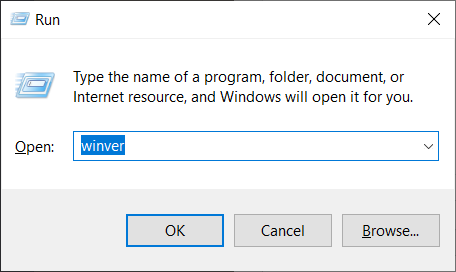
You do not need to do the above step to do a in-place edition change if you’re already running Windows 10 Professional. The easiest way to check is to press the Windows Key and R keys on the your keyboard at the same time and enter “winver” at the prompt as seen below. Or just search for winver in the start menu.
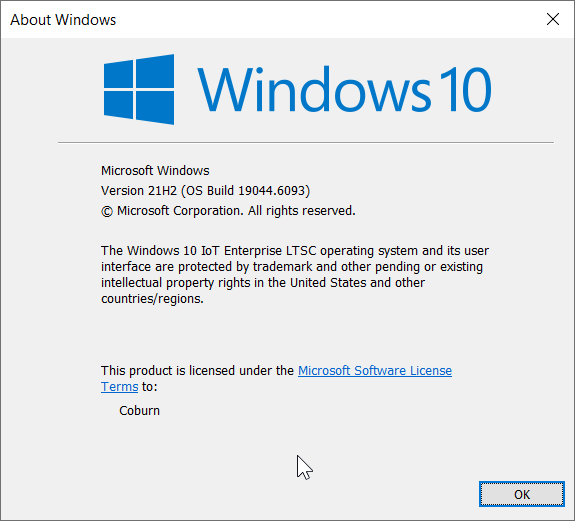
Then, you should get something like the following screenshot. Take note of what it says in the paragraph below the version details. In my example, I am using the IoT Enterprise LTSC edition of Windows 10.
Running the MAS toolbox…
To do note: I will do a proper guide (and video, maybe) on how to do the edition switch using MAS at a later date.
You may need to temporarily disable your Antivirus software as sometimes MAS is flagged as malicious when in reality, it’s actually quite clean and the source is open to the public to inspect.
Open PowerShell, enter the following text, press Enter and you should then be greeted with the main menu of MAS.
irm https://get.activated.win | iex
You don’t have to worry about the link being compromised, what I put above is copied verbatim from their website. This is what you should have entered before pressing Enter:
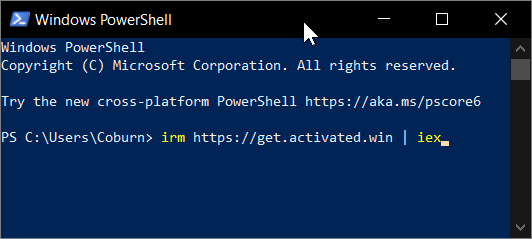
You will see some black boxes appear and disappear, then a User Account Control prompt will appear. Allow it. MAS will start up and eventually go to the main menu.
At the main menu of MAS, you want to press ‘7’ for “Change Windows Edition” and follow the prompts to select the “Professional” version. Then, follow the prompts.
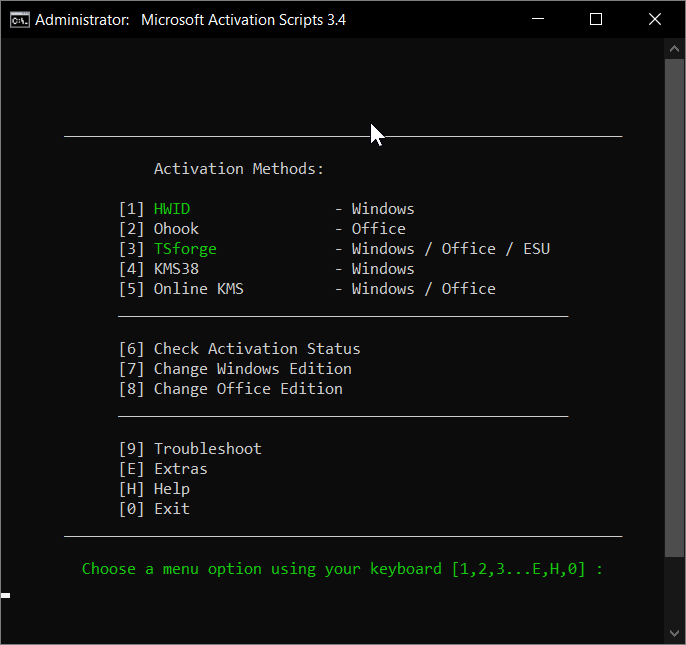
Note: There’s no screenshot showing the list of versions I can change to, since I’m running a version of Windows that only has one other version and Professional is not an option – sorry to disappoint.
If all goes well, your computer will reboot into the newly converted install to Windows 10 Professional. That’s very important!
Run the winver command again (see above) to confirm. It should say “Windows 10 Professional” in the first paragraph, such as “The [Windows 10 version] operating system […]”.
Forging some golden tickets…
Firstly, you need to activate the converted installation. This updates your license from Home to Professional.
Then fire up MAS again, and choose option ‘1’ for “HWID – Windows”. Follow the steps, then go back to the main menu.
You want to pick option ‘3’ for “TSforge – Windows / Office / ESU”. On the sub menu, you want to pick option ‘2’ for “Activate – ESU”.
Let the program forge the golden tickets and upon completion, congratulations!
Your copy of Windows is now supported until 2029 via the extended service golden tickets. Mission complete.
Route B
Grab a copy of the Microsoft Windows 10 Enterprise LTSC ISO from the website that Microsoft Activation Scripts are hosted and do what’s called an “in-place full upgrade” to that. This allows you to get updates to 2029 or 2032 out of the box (as far as I know).
This is a little more involved, and best for a step-by-step guide as the in-place upgrade can refuse to accept the IoT Enterprise product key without a specific file being created to bypass the refusal.
The general gist though is this:
-
- Download the Windows 10 Enterprise LTSC ISO
- Use an archiver like WinRAR or 7-Zip to extract the ISO to something like C:\Win10ISO on internal or external storage
- When extraction is complete, open Notepad, type the following and save it create a file called ei.cfg – the filename MUST be the one specified as if it’s not ei.cfg, but instead like ei.txt or ei.cfg.txt, it will not work – in the ISO’s sources folder. (Source)
[Channel]
NoKeyChannel
- Run the setup.exe in the root folder.
- Tell Setup not to go online, continue onwards and you should get a screen that says what edition to select. Select either Enterprise LTSC for updates to 2029 or IoT Enterprise LTSC for 2032. Continue and choose upgrade.
- Continue and you’ll be doing a in-place upgrade.
- Once complete and Windows is back in action, you’ll need to fire up MAS as shown in Route A and run option 1 for HWID Activation.
- Congratulations, you now have updates until 2029/2032!
Is that workaround legal? Will I get Microsoft lawyer ninjas on my doorstep?
This is a grey area, at best.
Honestly, if you’re doing these workarounds for private use then I can’t see why you’d get in trouble. Therefore, I’d say you’d be safe.
These workarounds are using Microsoft’s own methods of activation and any loop hole exploits in their licensing subsystems, so it’s honestly a grey area.
In a commercial setting though, you can get into trouble if you got reported to Microsoft. However, the chances of that are slim unless you FAFO. Again, it’s a grey area but I’d recommend excising caution.
All conversions I do are on my private machines that I own as well as virtual machines. Your mileage may vary in a commercial setting. However, I am not a lawyer.
Conclusion
By doing a in-place upgrade to a LTSC version of Windows 10, you can avoid having to pay for updates until 2029/2032. This is not only cost effective, but allows you to keep using your computer without having to concern yourself of Microsoft’s bullshit.
There will be a time that you need to consider a proper upgrade, but if you do either one of the two routes, you’ll have another few years of updates before Windows 10 will be obsoleted.